eCommerce Keyword Research: How to Find Keywords That Actually Sell

eCommerce keyword research is the process of finding the searches your future customers use to find products like yours, then deciding which pages on your store should rank for each one. The difference from ordinary keyword research is the goal. You're not looking for the biggest numbers; you're looking for searches from people ready to buy products you can sell at a healthy margin. A keyword with modest volume, clear buying intent and a high-margin product behind it is usually worth more than a popular keyword that sends browsers to your lowest-margin item.
This guide walks through the full process for an online store, whether it runs on Shopify, WooCommerce or another platform: understanding intent, finding category and product keywords, learning from competitors and marketplaces, using the data you already have, scoring keywords by margin, intent and difficulty, and mapping each keyword to one page. It ends with a template and a plan for turning research into pages.
Why eCommerce keyword research is different
Most keyword research advice is written for blogs and lead-generation sites, where the goal is traffic or an inquiry. Stores have different problems:
- Your money pages are category and product pages, not articles. The main job of research is deciding what those pages should be called, how they're grouped and what each one targets.
- Not every sale is worth the same. Two keywords with similar volume can lead to products with very different margins. Research that ignores margin can fill your store with traffic that doesn't make money.
- You compete with marketplaces and big retailers. For many broad product searches, the first page is full of Amazon, big-box retailers and Google Shopping results. You need to find the searches where a specialist store can win.
- Catalogs change. Products sell out, get discontinued and change seasonally. Your keyword plan must cope with pages that come and go.
- Structure matters as much as words. Filters, variants and duplicate collection paths can create many URLs for the same products. Good research shapes the site structure so each keyword has one clear home.
The approach in this guide comes from one principle: prioritize keywords by purchase intent and product margin rather than raw search volume. Volume still matters, but as a tie-breaker, not the starting point.
Mapping keywords to the buyer journey
Shoppers search differently at each stage of a purchase. Sorting keywords by stage tells you which type of page should target them.
| Stage | What the shopper wants | Example searches | Best page type |
|---|---|---|---|
| Problem or need | To understand a problem or option | how to make cold brew at home; why is my espresso bitter | Blog guide linking to relevant collections |
| Exploring the category | To see what's available | burr coffee grinders; pour over coffee makers | Collection or category page |
| Comparing options | To narrow down choices | best burr grinder for espresso; ceramic vs steel burrs | Buying guide or comparison, linking to products |
| Ready to buy | A specific product or a narrow set | [brand] [model] grinder; 58mm espresso tamper | Product page or narrow collection |
| After purchase | Help using or maintaining it | how to clean a burr grinder; replacement burrs [model] | Support content, accessory and parts pages |
Most stores should start in the middle rows, where people are exploring and buying. Those searches lead straight to collection and product pages that can make sales. Problem-stage and after-purchase content builds reach, trust and internal links over time, and works best once your core pages are in place.
Finding category and collection keywords
Category keywords are usually the most valuable searches for a store. They have meaningful volume, clear commercial intent, and they lead to pages that show many products at once. Start here.
- List your current categories and the way you'd describe them. Then forget your internal names. Customers rarely use the same words as your product team.
- Use Google's autocomplete. Type each category into Google and note the suggestions. Add letters after the main term ("burr grinder a", "burr grinder b") to surface more variations.
- Check "People also ask" and related searches at the bottom of the results page. They show how people phrase the category and which sub-types they care about.
- Use a keyword tool such as Google's Keyword Planner or a third-party SEO tool to get volume estimates and related terms. Treat volumes as rough ranges for comparison, not exact counts.
- Look for natural sub-categories. If people search for "electric burr grinder" and "manual burr grinder" as separate things, and you have enough products for each, those may deserve their own collection pages.
A practical test for whether a keyword deserves its own collection page: you have enough relevant products to make a useful page, people search for it as a distinct thing, and the top results are collection or category pages rather than single products or articles. If a sub-category would only hold one or two products, target it on an existing page instead.
Finding product and modifier keywords
Product keywords are narrower and usually have lower volume, but searchers are often ready to buy. They fall into a few groups:
- Brand and model searches: "[brand] [model]". If you stock branded products, these searches are often your highest-converting traffic, but you're competing with every other retailer that sells the same model.
- Attribute searches: size, material, color, capacity, compatibility. "Stainless steel milk pitcher 12 oz" or "58mm espresso tamper".
- Use-case searches: "grinder for French press", "travel coffee maker for camping".
- Audience searches: "coffee gifts for dad", "beginner espresso machine".
- Commercial modifiers: "buy", "price", "sale", "best", "review", "vs", "near me" (for stores with local pickup).
Use product keywords to shape product titles, descriptions and the attributes you highlight. A product title that includes the words people actually search ("Ceramic Burr Manual Coffee Grinder" rather than a made-up product name alone) helps both search engines and shoppers.
Modifiers also help you spot new collection opportunities. If many searches combine a category with the same attribute ("gluten-free protein bars", "vegan protein bars"), and you have enough products, a filtered collection for that attribute may be worth creating as a proper, indexable page.
Mining competitors and marketplaces
Your competitors and the big marketplaces have already done a lot of keyword research for you. Learn from it without copying it.
Competitor stores
- Study their navigation. The category names and structure of successful specialist stores show which groupings customers respond to.
- Use an SEO tool's competitor reports to see which keywords their category and product pages rank for. Look for keywords where they rank and you don't, and for categories they cover that you've ignored.
- Read their category pages. Note how they describe products, which questions they answer and which filters they offer.
Marketplaces
- Amazon, Etsy and eBay search suggestions reflect what shoppers type when they're ready to buy. Type your category into each and note the suggestions.
- Marketplace category trees show how products are commonly grouped.
- Customer reviews and Q&A sections reveal the words buyers use, the features they care about and the questions they ask before buying. These are good sources of modifier keywords and FAQ content.
Use competitor research to find gaps, not to duplicate their pages. A page that adds nothing beyond what the top results already offer has little reason to rank above them.
Using Search Console data you already have
If your store has been live for a while, Google Search Console is the most reliable keyword source you have, because it shows real searches that already find your site. The Performance report shows clicks, impressions, click-through rate and average position, grouped by query, page, country, device and more. Its default view covers the last three months.
Useful ways to mine it:
- Find near-miss keywords. Filter for queries with plenty of impressions and an average position between roughly 8 and 20. These are searches where you're close to page one or the top of it, and improvements to the matching page can move them.
- Find mismatched pages. Click a query and check the Pages tab. If a blog post is ranking for a buying keyword, a collection page may serve that search better.
- Find keywords you didn't know about. Look for product types, attributes or use cases you hadn't considered. They may justify new collections or better product copy.
- Spot low click-through rates. Pages with many impressions but few clicks may need better title tags and meta descriptions.
- Check for cannibalization. If several of your pages swap positions for the same query over time, they may be competing with each other. More on this below.
Search Console tells you which searches bring visitors, but not which visitors buy. Pair it with your store analytics. In Google Analytics or your platform's reports, look at revenue and conversion rate by landing page for organic search traffic. A collection page that gets modest traffic but converts well deserves more attention than a blog post with plenty of visitors who never buy. Matching the two views (queries per page from Search Console, revenue per page from analytics) shows you which keywords already lead to sales, and which pages have traffic but a conversion problem.
Don't ignore your own site search either. If your store has a search bar, its reports show the exact words visitors type when they can't find what they want in your navigation. Repeated searches for a product type you stock but haven't given its own collection are a strong signal to create one. Repeated searches for products you don't stock may point to a gap in your range.
If you also run Google Ads or Shopping, the search terms report shows which searches led to sales. Searches that convert well in ads are strong candidates for organic targeting too.
Judging intent from the search results page
The fastest way to understand what a keyword means to Google is to search it and look at what ranks. Before you assign a keyword to a page, check the results (ideally in a private window, set to your target country):
- Mostly collection or category pages: the searcher wants to browse options. Target it with a collection page.
- Mostly product pages: the searcher wants a specific item. Target it with a product page.
- Mostly articles and guides: the searcher wants information. Target it with a blog post or buying guide that links to your products, not a collection page.
- A mix: intent is split. Pick the page type that best fits your strength, and expect a harder fight.
- Marketplaces and huge retailers everywhere: difficult for a specialist store. Look for a more specific version of the keyword.
- Shopping ads and product listings at the top: a strong buying signal, and a sign that paid Google Shopping campaigns may capture this demand faster than SEO.
Getting intent right matters more than almost anything else. A beautifully optimized collection page will struggle to rank for a keyword where Google shows only how-to articles, and vice versa.
Scoring keywords by margin, intent and difficulty
Once you have a list, you need a way to decide what to work on first. A simple scoring model keeps decisions consistent.
Rate each keyword on three factors:
- Purchase intent (1–5): 5 for "ready to buy" searches that lead to products or collections, 1 for purely informational searches.
- Margin (1–5): based on the gross margin of the products the keyword leads to. Use your real margins after product cost, shipping, fees and typical discounts.
- Difficulty (1–5): 1 for keywords where similar stores already rank, 5 for keywords dominated by marketplaces and big retailers. A keyword tool's difficulty score is a useful starting point; your own look at the results page is the check.
Then calculate a priority score: (intent × margin) ÷ difficulty. Volume becomes a tie-breaker between keywords with similar scores, or a reason to skip a keyword with almost no searches.
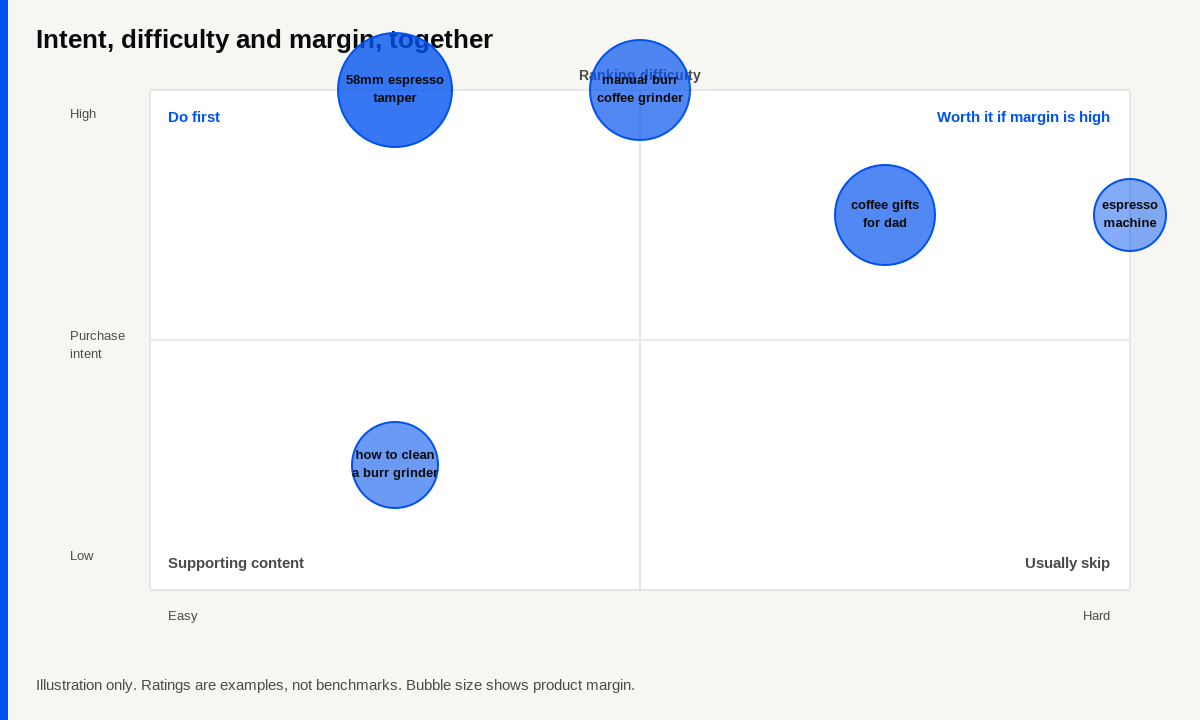
Here is an illustration using a made-up coffee equipment store. The ratings are invented for the example, not benchmarks.
| Keyword | Intent | Margin | Difficulty | Score | Decision |
|---|---|---|---|---|---|
| manual burr coffee grinder | 5 | 4 | 3 | 6.7 | Priority collection page |
| 58mm espresso tamper | 5 | 5 | 2 | 12.5 | Top priority: strong product page and accessory collection |
| espresso machine | 4 | 2 | 5 | 1.6 | Low priority: broad, dominated by big retailers, thin margin |
| how to clean a burr grinder | 2 | 3 | 2 | 3.0 | Later: support article linking to cleaning products |
| coffee gifts for dad | 4 | 4 | 4 | 4.0 | Seasonal gift guide before the holidays |
The broad, high-volume "espresso machine" keyword lands near the bottom, because the store's margin on machines is thin and the results are crowded with huge retailers. A narrow accessory keyword with a high-margin product rises to the top. That is the point of scoring by margin and intent: it points effort at the searches most likely to produce profitable sales.
Adjusting for volume, seasonality and repeat purchases
Three adjustments keep the score honest without making it complicated:
- Volume floor. Set a minimum below which you won't build a dedicated page, even for a high score. Very low-volume keywords can still be covered as secondary terms on a related page.
- Seasonality. Gift, holiday and weather-driven searches peak at predictable times. Pages need to exist and be indexed well before the peak, so schedule seasonal keywords months ahead, not weeks.
- Repeat purchases. Consumables and refills (filters, coffee beans, replacement parts) can be worth more than their first-order margin suggests, because customers come back. If your data shows strong repeat buying for a product line, nudge its margin rating up.
Keep the model simple. Its job is to make trade-offs visible, not to produce a precise number.
Mapping keywords to pages (and avoiding cannibalization)
Every important keyword should have exactly one target page, and every important page should have one primary keyword with a few close variations. When two or more of your pages target the same search, they can compete with each other, which is often called keyword cannibalization. Search engines may switch between them, and neither performs as well as one strong page would.
Rules that prevent most problems:
- One primary keyword per page. Group close variations ("burr grinder", "burr coffee grinder", "coffee burr grinder") on the same page rather than creating near-duplicate pages.
- Collections own category keywords; products own product keywords. Don't let a product page compete with its own collection for the broad category term.
- Blog posts own informational keywords. A guide to choosing a grinder should link to the grinder collection, not try to rank for "buy burr grinder".
- Control filter and variant URLs. Filters for color, size or price can create many URLs that show similar products. Decide which filtered views deserve to be indexable pages, and keep the rest out of the index. Google's guidance on ecommerce URL structure recommends minimizing alternative URLs that return the same content, giving each variant a distinct URL, and using a consistent canonical URL in internal links, sitemaps and canonical tags.
- Watch platform duplicates. On Shopify, products live at
/products/and can also be reached through collection paths; on WooCommerce, the default bases are/product/and/product-category/. Both platforms handle canonical tags by default, but themes and apps can introduce duplicates. Our technical SEO checklist covers how to check.
If you find cannibalization, decide which page should own the keyword, then strengthen it: merge useful content from the weaker page, redirect it if it no longer serves a purpose, and update internal links so they point to the chosen page with descriptive anchor text.
Building a keyword map template
A keyword map is a spreadsheet that records which keyword each page targets. It's the document that turns research into decisions, and it stops future pages from accidentally competing with existing ones.
Useful columns:
| Column | What goes in it |
|---|---|
| Page URL | The existing or planned URL |
| Page type | Collection, product, guide, support article |
| Primary keyword | The one main search this page targets |
| Secondary keywords | Close variations and modifiers covered on the same page |
| Intent / stage | Browse, compare, buy, learn, support |
| Volume (range) | From your keyword tool, as a rough range |
| Intent, margin, difficulty | Your 1–5 ratings |
| Priority score | (intent × margin) ÷ difficulty |
| Current position | From Search Console, if the page exists |
| Status / action | Create, improve, merge, redirect, leave |
| Internal links from | Pages that should link here |
Before creating any new page, check the map. If a page already targets that keyword, improve it rather than adding another. Review the map whenever you add a category, discontinue a product line or plan seasonal pages.
Turning research into a content and page plan
Research only pays off when it changes your store. Turn the keyword map into a plan in this order:
- Fix and improve existing collection pages for your top-scoring category keywords. Update title tags, H1s and introductions to match the keyword and intent, add helpful copy that answers buyers' questions, and make sure filters and sorting work well.
- Create missing collection pages where you have enough products and a clear search demand.
- Improve product pages for high-margin products: clear titles with the words people search, unique descriptions (not just manufacturer copy), specifications, sizing, shipping information, reviews and good images.
- Add buying guides and comparisons for "best" and "vs" searches, linking to the relevant collections and products.
- Build support and problem-stage content that answers questions and links to products and accessories.
- Link it all together. Guides link to collections, collections link to products and sub-collections, and products link to related items and accessories.
A worked example
Back to the made-up coffee equipment store. After scoring, its plan for the next quarter might look like this:
- Month 1: rewrite the espresso accessories collection around "espresso tamper" and related accessory searches; improve the product pages for its own-brand tampers with sizes, materials and compatibility in the titles and descriptions; rewrite the manual grinder collection's title, H1 and introduction around "manual burr coffee grinder".
- Month 2: create a separate electric grinder collection, because searches for electric and manual grinders are distinct and the store has enough products for both; publish a "manual vs electric burr grinder" comparison linking to both collections.
- Month 3: publish a gift guide ahead of the holiday season; write a grinder cleaning guide that links to cleaning tablets and brushes; review Search Console for near-miss queries on the pages improved in month 1.
Notice what's missing: a push for "espresso machine". The research showed it's broad, crowded and low-margin for this store, so its machines are better served by Google Shopping ads and by linking from guides, not by a battle for the broadest term.
Common mistakes to avoid
- Chasing the biggest keyword in the category before winning the specific searches you can realistically rank for.
- Creating a page for every keyword variation, which splits authority and causes cannibalization.
- Using manufacturer descriptions unchanged on product pages, so your pages say exactly what every other retailer's pages say.
- Letting filters create thousands of indexable URLs with near-identical content.
- Ignoring margin, and ending up with plenty of traffic to products that barely make money.
- Doing the research once and never updating it as the catalog changes.
Keep the work tied to sales. Track rankings and clicks in Search Console, but judge success by revenue from organic search for the pages you've worked on, and by the margin on those sales. A store that ranks for fewer keywords but sells more of its best products is winning.
The platform matters too. Shopify and WooCommerce give you different levels of control over URLs, filters and templates. If you're still choosing, see our Shopify vs WooCommerce comparison. We're a Shopify Partner and build stores on both platforms. If a collection page ranks but doesn't convert, the problem may be the page rather than the keyword, which is where conversion rate optimization helps.
If you'd like help, our eCommerce SEO services start with exactly this research, built around your margins, and our Shopify SEO service handles the platform-specific details. Not sure where your store stands? Request a free audit. We'll review your site and send prioritized findings within 5 business days.
Frequently asked questions
How do I find keywords for my eCommerce store?
Start with your categories and the words customers use for them. Use Google autocomplete, People also ask, a keyword tool, competitor stores, marketplace search suggestions and your own Search Console data. Then check the results page for each keyword to confirm whether it needs a collection page, a product page or a guide.
Should eCommerce keywords target category pages or product pages?
Broad category searches usually belong on collection or category pages, because the searcher wants to see options. Specific brand, model or attribute searches usually belong on product pages. Check what already ranks for each keyword: if the top results are collection pages, target it with a collection page.
How do I prioritize keywords for an online store?
Rate each keyword for purchase intent, the margin of the products it leads to and ranking difficulty, then score it as intent times margin divided by difficulty. Use search volume as a tie-breaker. This points effort at searches that are likely to produce profitable sales, not just traffic.
What is keyword cannibalization in eCommerce?
It happens when two or more pages on your store target the same search, such as a collection page and a product page both aiming at a broad category term. They can compete with each other. Give each important keyword one target page, and merge, redirect or relink pages that overlap.
Is search volume important in eCommerce keyword research?
It matters, but less than intent and margin. A modest-volume keyword with clear buying intent and a high-margin product behind it is often worth more than a popular keyword dominated by marketplaces. Treat tool volumes as rough ranges for comparing keywords, not exact counts.
How often should I redo keyword research for my store?
Review your keyword map whenever you add a category, launch or discontinue a product line, or plan seasonal pages, and check Search Console regularly for new queries and near-miss rankings. A fuller review once or twice a year keeps the plan in step with your catalog and the market.