AI Agents for Business: A Practical Guide to Use Cases, Costs and Risks

AI agents for business are software assistants that can understand a request, decide what to do and take action in your systems, such as answering a customer, booking an appointment or updating an order, with limited human input. They can save real hours and protect revenue that would otherwise slip away through missed calls and slow replies. They can also cost more than expected and cause embarrassing mistakes if they are given the wrong job. The businesses that get value from them pick their first use case by hours saved and revenue protected, not by how impressive a demo looks.
This guide is for owners and managers of US small and mid-size businesses, especially online stores and home and local service businesses. It explains what an AI agent is, where it fits, what it costs, what can go wrong and how to roll one out from pilot to production. It stays vendor-neutral: the right platform depends on your systems and your use case, and the market changes too fast for a list of tools to stay accurate.
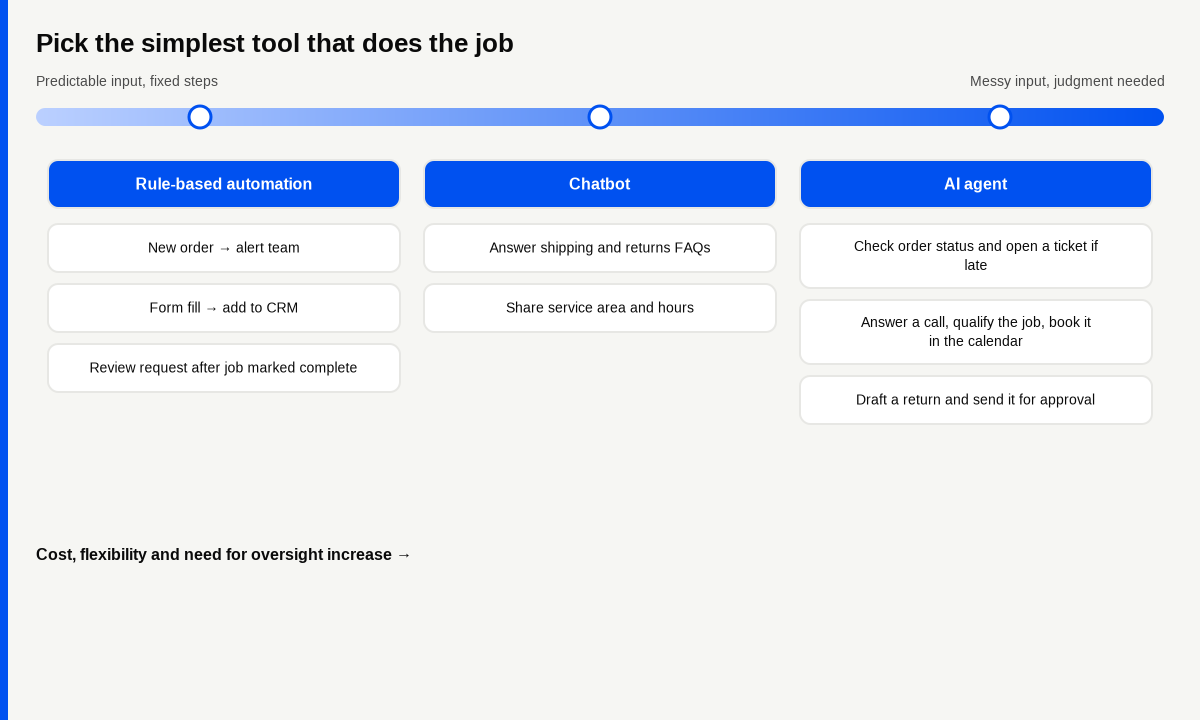
What an AI agent is (and how it differs from a chatbot or automation)
"AI agent" is used loosely in marketing, so it helps to separate three things that often get lumped together.
| Rule-based automation | Chatbot | AI agent | |
|---|---|---|---|
| How it works | Fixed "if this, then that" rules | Answers questions in conversation, from scripts or a language model | Uses a language model to understand a goal, then plans and takes steps using connected tools |
| Handles messy input? | No: input must match the rule | Partly: understands varied wording | Yes, within the limits you set |
| Takes action? | Yes, but only the action it was programmed for | Usually not, or only simple actions | Yes: looks things up, updates records, books, escalates |
| Example | New order → send a Slack alert and add a row to a spreadsheet | Website widget that answers shipping and returns questions | Reads a customer's "where's my order?" message, checks the order system, gives the tracking status, and opens a ticket if the parcel is late |
| Main risk | Breaks when inputs change | Gives wrong or made-up answers | Takes the wrong action, or is manipulated into doing so |
An agent typically has four parts: a language model that understands requests and decides what to do; instructions that define its role, rules and limits; tools, meaning connections to your systems (your store, calendar, CRM, help desk or phone line); and knowledge, such as your policies, product data and FAQs. The tools are what make it an agent rather than a chatbot. They are also where most of the value and most of the risk sit.
An important practical point: you don't always need an agent. If a task follows the same steps every time and the input is predictable, rule-based automation is cheaper, faster and more reliable. Agents earn their cost when the input is unpredictable (free-text messages, phone calls, varied requests) and the task needs judgment about what to do next.
Where agents fit in a small or mid-size business
Agents fit best where three conditions meet:
- High volume of similar requests. The same dozen questions or tasks come up over and over.
- Unstructured input. Requests arrive as emails, chats, texts or calls in customers' own words.
- A clear, checkable outcome. You can tell whether the agent got it right: the appointment was booked, the order status was correct, the lead was qualified and routed.
They fit poorly where mistakes are costly and hard to undo, where every case is genuinely different, or where the work depends on relationships and trust built person to person. A good rule of thumb is to let agents handle the first response, the routine middle and the paperwork, and keep people on the decisions that carry real risk or require empathy.
For most small businesses, agents show up in three places: the front door (website chat, phone and messaging), the back office (data entry, follow-ups, scheduling, reporting) and internal help (answering staff questions from your own documents).
Use cases for eCommerce brands
Online stores get a steady stream of repetitive questions and tasks, which makes them good candidates for agents. Common uses:
- Order status and tracking. For many stores, "Where is my order?" is a question the support team answers again and again. An agent connected to your store and shipping data can answer it instantly, at any hour, and escalate genuine problems.
- Pre-sale product questions. Sizing, compatibility, materials, stock levels and shipping times. An agent that answers from your real product data can help shoppers decide without waiting for an email reply.
- Returns and exchanges. Checking eligibility against your policy, starting the return and sending the label or instructions, with a human approving exceptions.
- Cart recovery and post-purchase follow-up. Personalized follow-ups that answer the question that stopped the purchase. These work alongside, not instead of, your email flows (see our Klaviyo email marketing service).
- Back-office work. Tagging and routing support tickets, drafting product descriptions for human review, summarizing reviews, flagging inventory issues and preparing daily reports.
The agent is only as good as the data behind it. If your product information, policies or order data are incomplete or out of date, fix that first. It's also worth making sure your store platform can connect cleanly to the tools you'll use. We build both Shopify and WooCommerce stores, and the integration options differ between them, as our Shopify vs WooCommerce comparison explains.
Use cases for service businesses
For contractors and other home and local service businesses, the biggest leak is usually at the front door: calls and messages that come in when nobody can answer. Common uses:
- Answering calls and booking jobs. An AI voice agent can answer when the team is on a job or the office is closed, collect the customer's details and problem, check the calendar and book an appointment or request a callback.
- Website chat and text replies. Answering service-area, availability and "do you do this?" questions instantly, and capturing the lead while the customer is still interested.
- Lead qualification and routing. Asking the questions your office manager would ask (what's the problem, where are you, how urgent is it) and sending the lead to the right person with a summary.
- Appointment reminders and rescheduling. Confirming appointments, handling reschedules and reducing no-shows.
- Follow-ups and review requests. Following up on open estimates and, after a job, asking every customer for an honest review (never only the happy ones, which breaks Google's review policy).
- Office work. Turning call notes into job tickets, updating the CRM, drafting estimates from a technician's notes for review.
For service businesses, the measure that matters is booked jobs. An agent that answers every call but books nothing useful isn't helping. Design it around the outcome: a qualified lead or a booked appointment in your system.
How to choose the first workflow to automate
The most common mistake is starting with the most exciting idea rather than the most valuable one. A simple scoring exercise keeps the choice grounded.
- List candidate workflows. Ask your team which tasks are repetitive, interrupt real work or cause customers to wait. Look at your call logs, inbox and help desk for the most common requests.
- Estimate hours saved. For each workflow: how many times does it happen a week, and how long does each one take? Multiply to get hours per week.
- Estimate revenue protected. Does the workflow affect sales? Missed calls, slow lead replies and abandoned carts cost money. Use your own numbers: how many leads or orders are lost, and what each is worth.
- Rate the risk. What happens if the agent gets it wrong? A wrong answer about store hours is minor. A wrong refund, a wrong price quote or a missed emergency call is not.
- Rate the feasibility. Is the data available and accurate? Can the agent connect to the systems it needs? Is the outcome easy to check?
Pick a workflow with high hours saved or revenue protected, low-to-moderate risk and good feasibility. For many stores, that's order-status questions. For many service businesses, it's answering and booking calls that would otherwise be missed. Avoid starting with anything that commits money, makes promises about price or touches sensitive data, until you've proven the agent on something safer.
Here is what the scoring might look like for a small home-service business. The ratings are illustrative, not benchmarks; your own will depend on your volumes and systems.
| Workflow | Hours saved | Revenue protected | Risk if wrong | Feasibility | Verdict |
|---|---|---|---|---|---|
| Answer and book after-hours calls | Medium | High | Medium (needs clear emergency escalation) | Good if the calendar is online | Strong first candidate |
| Appointment reminders | Medium | Medium (fewer no-shows) | Low | Good | Strong candidate; may only need rule-based automation |
| Quote prices over the phone | Low | Medium | High (wrong quotes damage trust and margin) | Poor unless pricing is standardized | Not a first project |
| Draft job tickets from technician notes | Medium | Low | Low (a person reviews) | Good | Good second project |
Notice that the reminder workflow may not need an AI agent at all. Scoring often reveals that simple automation covers part of the list, which saves money for the workflows where an agent's judgment actually matters.
Write down the baseline before you start: current hours spent, response times, missed calls, conversion rates. Without a baseline, you can't prove the agent worked.
Build vs buy: platforms and custom builds
There are three broad ways to get an agent, and each has trade-offs.
| Option | What it is | Pros | Cons |
|---|---|---|---|
| Built-in features | AI features inside tools you already use (help desk, store platform, phone system) | Fastest to start, data already connected, little setup | Limited to what the vendor offers; harder to customize; may lock you in |
| Agent platforms | Dedicated chatbot, voice-agent or automation platforms you configure | More control, many integrations, no code or low code | Subscription and usage fees; still needs careful setup and testing |
| Custom build | An agent built on a language model API, connected to your systems by developers | Fits your exact workflow and systems; you control data handling | Highest upfront cost; needs ongoing maintenance and monitoring |
Many businesses mix approaches: a platform for the phone or chat front end, with custom connections to their CRM or store. Questions to ask any vendor or builder:
- Which of our systems will it connect to, and how? What happens when one of them changes?
- Where is our data stored and processed? Is it used to train anyone's models?
- How do we see what the agent said and did? Can we review every conversation?
- How does it hand off to a person, and how fast?
- What does it cost at our volume, including usage fees, not just the base plan?
- Can we export our data, configuration and conversation history if we leave?
Warning signs when evaluating vendors
- Guaranteed results. No one can promise a specific number of booked jobs or a set reduction in support tickets before seeing your data and workflow.
- No way to review conversations. If you can't see what the agent said and did, you can't catch mistakes or prove value.
- "Fully autonomous" as a selling point. For most small businesses, the safest and most useful agents are deliberately limited, with clear escalation to a person.
- Vague answers about data. You should get a clear answer on where customer data goes, who can see it and how long it's kept.
- Pricing that only shows the base plan. Ask for an estimate at your real volume of calls, chats or messages, including usage fees.
What it costs to build and run an agent
Agent pricing varies widely and changes often, so rather than quote figures that will go stale, here are the cost components to budget for.
Upfront costs
- Discovery and design: mapping the workflow, writing the rules, deciding what the agent can and can't do.
- Setup and integration: connecting your store, calendar, CRM, phone system or help desk. This is often the largest part of the work.
- Knowledge preparation: cleaning up the policies, FAQs and product data the agent will rely on.
- Testing: running realistic scenarios, including awkward and adversarial ones, before customers see it.
Running costs
- Platform subscriptions: monthly fees for any agent, chat or voice platform.
- Usage fees: many platforms and model providers charge per conversation, per message, per minute of voice or by the amount of text processed. Costs rise with volume, so estimate from your real call and message counts.
- Telephony: phone numbers and per-minute call charges for voice agents.
- Monitoring and improvement: someone reviewing conversations, fixing wrong answers and updating knowledge as your business changes.
Hidden costs
- Mistakes: refunds, discounts or lost customers caused by wrong answers.
- Staff time: handling escalations and reviewing the agent's work, especially early on.
- Switching costs: rebuilding if a vendor changes its pricing or product.
Compare the total against the value from the previous section: hours saved multiplied by what that time costs you, plus the revenue the agent protects. If the numbers only work under optimistic assumptions, start smaller.
Data, privacy and security considerations
An agent that can act in your systems needs access to them, and that access is the main source of risk. This section covers the main issues. It isn't legal advice; talk to a qualified professional about your specific obligations.
Prompt injection and manipulation
Language models can be manipulated by the text they read. The OWASP Gen AI Security Project lists prompt injection as the top risk for applications built on large language models: a user's message, or hidden text in a web page or document the agent reads, can change the model's behavior in unintended ways. OWASP notes it's unclear whether foolproof prevention exists, and recommends limiting impact instead. In practice that means:
- Least privilege: give the agent only the access it needs. An order-status agent needs to read orders, not issue refunds.
- Human approval for high-risk actions: refunds, discounts, account changes and anything involving money.
- Handle permissions in code, not in the prompt: enforce limits in the systems the agent calls, rather than trusting instructions alone.
- Test adversarially: try to trick the agent before customers do.
Accuracy and responsibility
Your business is responsible for what your agent says. In Moffatt v. Air Canada (2024), a Canadian tribunal held the airline liable after its website chatbot gave a customer incorrect information about bereavement fares, rejecting the argument that the chatbot was responsible for its own statements. The lesson for any business: ground the agent in your actual policies, keep those up to date, and route anything it isn't sure about to a person.
Phone calls and consent
Voice agents have specific rules. In February 2024, the FCC issued a declaratory ruling confirming that AI-generated voices count as "artificial or prerecorded voice" under the Telephone Consumer Protection Act, so outbound calls using them require the called party's prior express consent unless an exemption applies. Answering inbound calls is a different situation, but if your agent will place outbound calls (reminders, follow-ups or sales calls), get advice on consent first. Call-recording consent rules also vary by state, and some states require every party on the call to agree. Tell callers they're speaking with an automated assistant.
Customer data
- Know what customer data the agent sees, where it's stored, how long it's kept and whether the vendor uses it for training.
- Keep payment card details out of conversations. Let your payment system handle them.
- Update your privacy policy to cover AI tools that process customer information.
For a structured approach to AI risk, the voluntary NIST AI Risk Management Framework and its Generative AI Profile are good references, even for small teams.
Keeping humans in the loop
The goal isn't to remove people from the process. It's to spend their time where it matters. Good agent design makes the hand-off between agent and human smooth and predictable.
- Define what the agent must escalate: complaints, emergencies, high-value orders or jobs, legal or safety questions, anything involving money, and any request it isn't confident about.
- Make hand-offs warm, not cold. Pass the person a summary of the conversation so the customer doesn't have to repeat themselves.
- Always offer a way to reach a person. Customers who want a human and can't reach one become unhappy customers quickly.
- Use approval steps for consequential actions. The agent can draft the refund, the estimate or the email; a person approves it.
- Review conversations regularly. Read a sample every week, especially early on. Look for wrong answers, missed escalations and questions the agent couldn't handle, and fix the instructions or knowledge.
Writing the agent's job description
The clearest way to keep humans in the right places is to write the agent's instructions the way you'd brief a new hire. Spell out its role in one or two sentences, the tasks it handles, the sources of truth it must use (your policy pages, product data, service list and calendar), and the tone it should take with customers. Then list what it must never do: promise a price it can't look up, diagnose a safety problem, agree to a refund or discount without approval, or guess when it doesn't know. Finally, define the escalation path in plain terms, including who receives the hand-off, how quickly they should respond, and what the agent tells the customer while they wait.
Keep this document short enough that your team can read and update it, and version it, so you know which instructions were live when something went wrong. When you change prices, hours, policies or services, update the agent's instructions and knowledge on the same day you update your website.
Over time, as the agent proves reliable on a task, you can loosen approvals for low-risk actions. Do that deliberately, one step at a time, based on what the reviews show.
Measuring ROI: hours saved, response times and revenue
Measure the agent against the baseline you recorded before launch. Useful measures fall into three groups:
| Area | What to measure |
|---|---|
| Time | Staff hours spent on the workflow before and after; number of requests handled without human help |
| Speed and service | First response time; share of calls answered; resolution rate; customer satisfaction on agent-handled conversations; escalation rate |
| Revenue | Leads captured outside business hours; appointments booked; conversion rate of agent-assisted shoppers; recovered carts; jobs booked from calls that would have been missed |
| Quality and risk | Error rate found in reviews; complaints; refunds or credits caused by agent mistakes |
Be careful with vanity numbers. "Conversations handled" says nothing about whether customers got what they needed. Look at outcomes: problems resolved, appointments kept, orders placed. Then compare the value against the full cost, including the time your team spends supervising the agent.
ROI is easiest to prove for the front-door use cases, where you can count missed calls or slow replies before and booked jobs or sales after. Back-office gains are real but harder to see, so track hours carefully.
A rollout plan from pilot to production
A staged rollout limits risk and builds the evidence you need to expand.
Stage 1: Define (1–2 weeks)
- Pick one workflow using the scoring exercise above.
- Record the baseline numbers.
- Write the agent's job description: what it does, what it never does and when it escalates.
- Prepare the knowledge it needs and check it's accurate.
Stage 2: Build and test internally
- Set up the agent with the minimum access it needs.
- Test with your team using real past requests, edge cases and deliberate attempts to break it.
- Fix wrong answers and tighten the rules until results are consistent.
Stage 3: Limited pilot
- Go live in a limited way: after-hours only, one channel, or a share of traffic.
- Review every conversation, or a large sample, during the pilot.
- Keep approvals on any consequential action.
Stage 4: Expand
- Compare pilot results with the baseline. Expand only if the numbers and the quality reviews support it.
- Widen hours, channels or traffic gradually.
- Loosen approvals only where reviews show the agent is reliable.
Stage 5: Operate and improve
- Assign an owner who reviews performance and conversations regularly.
- Update knowledge when prices, policies, services or products change.
- Re-test after any change to the agent, its model or the systems it connects to.
- Once the first workflow is stable, use the same process for the next one.
Agents also change how customers find you. As more people ask AI assistants for recommendations, it helps to make your own business easy for those systems to understand. Our guide on how to get cited by ChatGPT and AI search covers that side.
If you'd like help, our AI agents and chatbots service designs, builds and monitors agents for online stores and service businesses, and our AI automation service covers the rule-based workflows that often sit alongside them. We start by finding the workflow with the clearest return, not the flashiest demo. Want an outside view first? Request a free audit of your website, and we'll send prioritized findings within 5 business days.
Frequently asked questions
What is an AI agent for business?
An AI agent is software that uses a language model to understand a request, decide what to do and take action in connected systems, such as checking an order, booking an appointment or updating a CRM. Unlike a basic chatbot, it can act, so it needs clear limits and human oversight.
What is the difference between an AI agent and a chatbot?
A chatbot mainly answers questions in conversation. An AI agent can also take steps in your systems, such as looking up an order, booking a job or opening a support ticket. That ability to act is what makes agents more useful and also what makes access controls and human approvals important.
How much does an AI agent cost for a small business?
It depends on the workflow, the platform and your volume. Budget for setup and integration, platform subscriptions, usage fees per conversation or minute, telephony for voice agents and someone to monitor and improve it. Compare the total with the hours saved and revenue protected before you commit.
What tasks should a small business automate with AI first?
Start with a frequent, low-risk task with a clear outcome, such as answering order-status questions for a store or answering and booking missed calls for a service business. Avoid starting with anything that issues refunds, quotes prices or handles sensitive data until the agent has proven reliable.
Are AI agents safe to use with customer data?
They can be, with the right controls. Give the agent only the access it needs, require human approval for actions involving money, keep payment details out of conversations, check how vendors store and use your data, and review conversations regularly. Prompt injection can't be fully prevented, so limit what a manipulated agent could do.
Can an AI voice agent make outbound calls to customers?
In February 2024 the FCC confirmed that AI-generated voices count as artificial voices under the TCPA, so outbound calls using them generally need the called party's prior express consent unless an exemption applies. Get advice on consent before using a voice agent for reminders, follow-ups or sales calls.