Google Ads for Small Business: A Complete Guide to Profitable Campaigns

Google Ads for small business works when every dollar of budget is tied to what a lead or sale is worth to you. Most small accounts that lose money don't fail because of bad ads. They fail because the budget was set by asking "how many clicks can I afford?" instead of "how much can I pay for a customer and still make a profit?" Start with your break-even cost per lead or per sale, build a tight campaign around your most profitable services or products, track real conversions, and review the account every week. Done that way, Google Ads is one of the fastest ways for a small business to reach people who are ready to buy.
This guide is for US small businesses: home and local service companies such as contractors, plumbers and HVAC firms, and small online stores. It walks through the whole process in order, from deciding whether Google Ads fits your business to the weekly routine that keeps a campaign profitable. Where we describe how Google Ads behaves, we link to Google's own help pages, because the platform changes often.
Is Google Ads right for your business?
Google Ads puts your business in front of people at the moment they search for what you sell. That makes it a demand-capture channel: it works best when people already search for your product or service. It is much weaker at creating demand for something nobody is looking for yet.
Google Ads is usually a good fit when most of these are true:
- People search for what you sell. "Water heater replacement near me", "commercial roof repair" or "organic dog treats" are real searches with buying intent. If your offer is new or hard to describe, search volume may be too thin to build a campaign on.
- A customer is worth enough to pay for. You need room between what a customer brings in and what it costs to win one. High-value services and products with healthy margins have that room. Low-priced, low-margin products often don't, unless customers buy again.
- You can answer leads quickly. For service businesses, a paid lead that waits hours for a callback is often a lost lead. If nobody can pick up the phone or reply to forms during business hours, fix that first.
- Your website can convert. Ads send visitors to a page. If that page is slow, vague or hard to use on a phone, you pay for clicks that go nowhere.
- You can measure results. You need to know which clicks became calls, form fills or orders. Without that, you can't tell a profitable campaign from an expensive one.
If several of these are missing, Google Ads can still work, but fix the gaps first. Spending more money won't fix a weak offer, a slow phone response or a page that doesn't convert. It only makes those problems more expensive.
It also helps to know what Google Ads is not. It isn't a replacement for search engine optimization: ads stop the day you stop paying, while organic rankings keep working, which is why many small businesses run both. For local service businesses, Google also offers Local Services Ads, a separate pay-per-lead format available in many trades. We compare the options in our SEO for contractors guide, and a dedicated guide to Local Services Ads is coming later in this series.
How much Google Ads costs and how to set a budget
There is no minimum spend for Google Ads, and there is no fixed price per click. You pay when someone clicks your ad, and the cost of each click is set in an auction that depends on how many other advertisers want the same searches, how much they bid and how relevant each ad is. The same keyword can cost very different amounts in different cities, industries and seasons. Any "average cost per click" you read online is a rough guide at best, which is why we don't quote one here.
What you control is your budget. In Google Ads, you set an average daily budget for each campaign. Google's help pages explain two rules that surprise many new advertisers:
- On any given day, a campaign can spend up to twice its average daily budget to take advantage of busier days.
- Over a month, it won't spend more than 30.4 times the average daily budget (30.4 is the average number of days in a month).
So a campaign with a $50 average daily budget might spend $90 on a busy Monday and $20 on a quiet Sunday, but the monthly total stays at or below about $1,520. Plan your budget as a monthly number and divide by 30.4 to get the daily figure.
The bigger question is how much the monthly number should be. The wrong way to answer it is to pick a figure that "feels affordable" and hope it produces leads. The right way is to start from what a lead or sale is worth to you, which is the next section.
Your total cost of Google Ads has three parts:
- Ad spend: what you pay Google for clicks.
- Management: your own time, or what you pay an agency or freelancer to build and run the account.
- Supporting costs: landing pages, call tracking, design and any tools you use.
Judge the campaign on all three combined. A campaign that looks profitable on ad spend alone can lose money once you count the hours it takes to run.
Working out your break-even cost per lead
Your break-even cost per lead is the most you can pay for a lead before you start losing money on the work it brings in. Once you know it, budgeting, bidding and judging results all get simpler.
For service businesses
You need three numbers, ideally from the last 6 to 12 months of your own records:
- Average job value: the typical revenue from one job of the type you want to advertise.
- Gross margin: the share of that revenue left after direct costs (materials, labor, subcontractors).
- Close rate: the share of leads that become paying jobs.
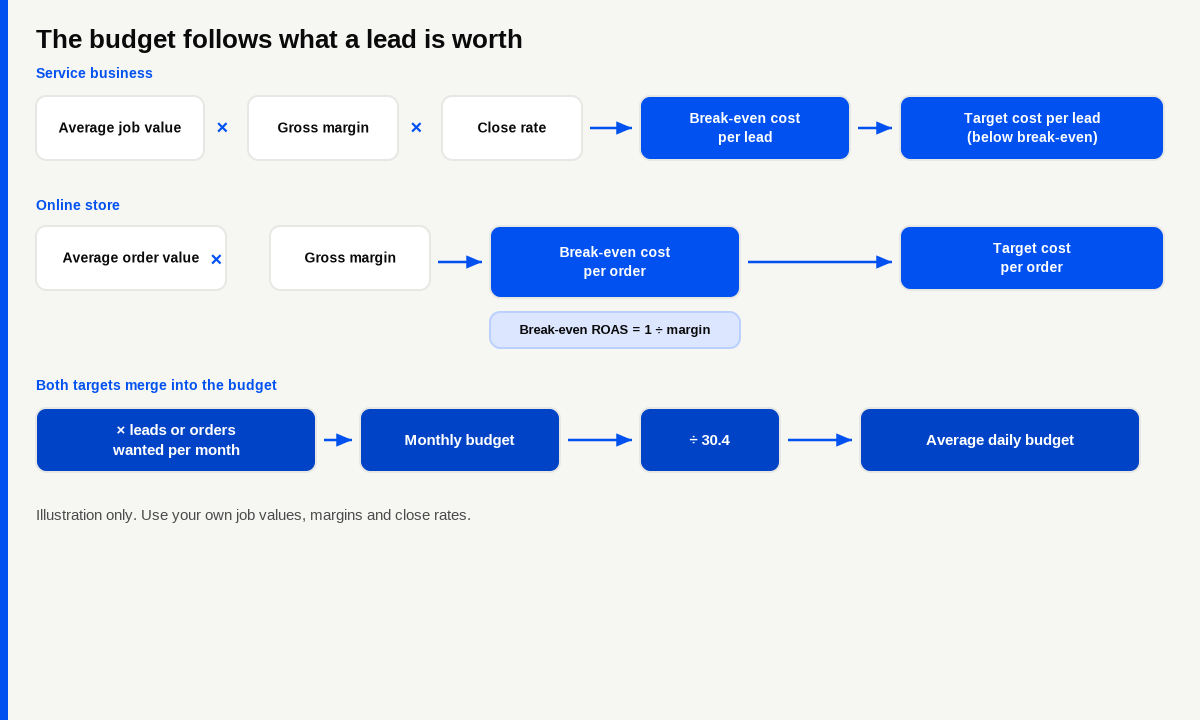
The formula is: break-even cost per lead = average job value × gross margin × close rate.
Here is an illustration with made-up round numbers, not a benchmark. Say a typical job is worth $2,000, your gross margin is 40% and you close 30% of leads. Each job leaves $800 of gross profit ($2,000 × 40%). If you close 3 in 10 leads, each lead is worth $240 of gross profit ($800 × 30%). That's your break-even: pay $240 per lead and you make no gross profit from ads at all.
You don't want to break even, so set a target cost per lead below it. How far below depends on your overheads and how much profit you need from each job. Many businesses also account for repeat work and referrals, which make a customer worth more than the first job. Write down your target and the reasoning behind it, and revisit it when your prices or close rate change.
For online stores
The logic is the same, using orders instead of leads: break-even cost per acquisition = average order value × gross margin, where gross margin is what's left after product cost, shipping, payment fees and discounts. With an illustrative $80 average order and a 45% margin, you can pay up to $36 in ad costs per order before you lose money on the first purchase.
Online stores often measure this as return on ad spend (ROAS): revenue divided by ad spend. Your break-even ROAS is 1 ÷ gross margin. At a 45% margin, that's about 2.2: you need roughly $2.20 in revenue for every $1 in ad spend just to break even. A campaign reporting a "3x ROAS" sounds good, but whether it's profitable depends entirely on your margin. Our Google Shopping management service is built around product margin for exactly this reason.
From target cost per lead to daily budget
Once you have a target, the budget follows: monthly budget = leads (or orders) you want per month × target cost per lead, then divide by 30.4 for the daily figure. If you want 20 leads a month at a $150 target, that's $3,000 a month, or about $99 a day.
Check that the result is realistic. If your budget only buys a handful of clicks a day in your market, you'll collect data very slowly and won't know for months whether the campaign works. In that case, narrow the campaign to fewer services, a smaller area or your best hours rather than spreading a thin budget across everything.
Account structure for small budgets
A small budget needs a simple structure. Every campaign you add splits the budget and the data further, and Google's automated bidding learns more slowly when each campaign gets only a few conversions a month.
A practical starting structure for most small businesses:
- One Search campaign for your most profitable service or product line, with its own budget.
- A few tightly themed ad groups inside it, one per service or product category. A plumber might have ad groups for water heaters, drain cleaning and repiping. A store might have one per main collection.
- A separate campaign only when the budget or goal is different. Common reasons are a different service area, a service with a very different job value, or protecting searches for your own brand name.
Google's own guidance on structure follows the same principle: organize ad groups around the products or services you offer, so the keywords, ads and landing page in each group all match one theme. A bakery should have separate ad groups for cookies, brownies and cupcakes, not one "bakery" group with everything mixed together.
Set a few campaign settings deliberately rather than accepting the defaults:
- Location: target the areas you actually serve. In the location options, choose to reach people in or regularly in your locations, rather than people who are only interested in them, unless you sell to travelers or people moving to your area.
- Networks: new Search campaigns may include search partners and the Display Network. For a small budget, start with Google Search only, so you can see what search clicks produce before testing anything else.
- Ad schedule: if you can only answer calls during business hours, consider running call-focused ads only when someone can pick up.
- Campaign type: Google promotes Performance Max, which runs across Search, YouTube, Display, Gmail and Maps from one campaign. It can work well once you have reliable conversion tracking and enough conversion data, but it gives you less visibility and control. Most small businesses learn more by starting with Search.
Keyword research and match types
Keywords tell Google which searches your ads may appear on. For a small budget, the aim is a short list of searches from people ready to buy, not a long list of everything related to your industry.
Finding keywords
- Start with how customers describe what they need. Look at your call notes, quote requests and emails. Customers say "AC not cooling", not "HVAC diagnostic service".
- Add intent words. Searches with "near me", "cost", "repair", "replacement", "install", "buy" or a city name usually signal someone close to buying. Searches with "how to", "DIY", "what is" or "jobs" usually don't.
- Use Google's Keyword Planner (inside Google Ads, under Tools) to see related searches and rough volumes, and to estimate bid ranges in your area.
- Check the search results yourself. Search each main keyword in your area. If the results are full of how-to articles, the searcher probably wants information, not a contractor or a product.
Match types
Each keyword has a match type that controls how closely a search must match it. Google's help page on keyword matching options describes three:
| Match type | How you write it | What it matches | When to use it |
|---|---|---|---|
| Broad match | water heater replacement | Searches related to your keyword, which can include searches that don't contain its words. It's the default. | With Smart Bidding and solid conversion tracking, once you have data to steer it. |
| Phrase match | "water heater replacement" | Searches that include the meaning of your keyword, often with extra words. | A good middle ground for most small accounts. |
| Exact match | [water heater replacement] | Searches with the same meaning or intent as your keyword. | Your highest-value searches, where you want the most control. |
Google recommends pairing broad match with Smart Bidding, because the bidding system uses signals at auction time to decide which of the wider set of searches are worth bidding on. That works when the system has good conversion data to learn from. For a new small account with little data, phrase and exact match usually give you more control while you learn which searches produce customers. Many accounts start there and test broad match once conversion tracking is proven.
Whatever you choose, keep each ad group's keywords closely related, so one ad and one landing page can serve all of them well.
Negative keywords: stop paying for the wrong clicks
Negative keywords stop your ads from showing on searches you don't want. For small budgets, they are one of the quickest ways to cut waste, because every irrelevant click comes straight out of a limited budget.
Common negative keywords for small businesses include:
- Job seekers: jobs, careers, hiring, salary, training, apprenticeship.
- DIY and research: how to, DIY, diagram, manual, parts (if you don't sell parts).
- Services you don't offer: a roofer who doesn't do gutters, a store that doesn't sell wholesale.
- Bargain hunters, if they don't fit: free, cheap, used. Only add these if they truly don't convert for you.
- Areas you don't serve: neighboring cities that appear in searches.
Negative keywords behave differently from regular keywords, and Google's help page on negative keywords spells out the main differences:
- They don't match close variants. If you add "job" as a negative, searches containing "jobs" can still trigger your ads. Add singular and plural forms and obvious synonyms yourself.
- Negative broad match (the default) blocks searches that contain all the negative words in any order. Negative phrase match blocks searches with the words in that order. Negative exact match blocks only that exact search.
- You can add them at several levels: the ad group, the campaign, a shared list applied to several campaigns, or an account-level list that applies across eligible Search and Shopping inventory.
The best source of negative keywords is your own search terms report, which shows the actual searches that triggered your ads. Review it every week in the early months, add negatives for anything irrelevant, and you'll see wasted spend fall over time. Be careful not to overdo it: too many negatives can block searches that would have converted.
Writing ads and choosing assets
Most Search ads today are responsive search ads. You write several headlines and descriptions, and Google tests combinations to find what works best for each search. According to Google's responsive search ads help page, you can provide up to 15 headlines and 4 descriptions for each ad.
Because Google can show your headlines in any order, each one has to make sense on its own. A useful way to fill the slots:
- What you do and where: "Water Heater Replacement in Austin".
- Why choose you: licensed and insured, same-day service, years in business (only if true), financing available.
- Proof you can show: your genuine review rating, warranties, guarantees you actually offer.
- Clear next step: "Call for a Free Estimate", "Book Online in 2 Minutes", "Shop the Collection".
- For stores: free shipping thresholds, return policy, price points and key product benefits.
If a line must appear in every ad (a license number or a required disclaimer, for example), you can pin it to a position. Pin sparingly, because every pin reduces the combinations Google can test.
Assets (previously called extensions) add extra information to your ad and often make it larger on the page. The ones most small businesses should set up:
- Call assets: your phone number, so mobile searchers can call straight from the ad. Essential for service businesses.
- Sitelinks: links to specific pages such as individual services, financing or reviews.
- Callouts: short phrases such as "Upfront Pricing" or "Free Returns".
- Location assets: connect your Google Business Profile so your address and map can appear.
- Structured snippets: lists such as service types or product brands.
Never make claims in ads you can't support on your website. Overpromising raises your click-through rate and then lowers your conversion rate, which is the worst combination.
Landing pages that turn clicks into leads
The landing page is where you pay for the click and earn (or lose) the lead. A good ad sent to your home page usually performs worse than the same ad sent to a page about exactly what was searched.
A landing page for a small business ad should have:
- A headline that matches the search. Someone who searched "emergency drain cleaning" should land on a page that says "Emergency Drain Cleaning", not "Welcome to Smith Plumbing".
- The next step above the fold on a phone: a tap-to-call button, a short form or an add-to-cart button that's visible without scrolling.
- Trust signals you can back up: real reviews, license and insurance details, warranties, photos of your real work or products.
- Clear information: what's included, the areas you serve, how pricing works, what happens after someone gets in touch.
- Speed. Compress images and remove heavy scripts. A page that loads slowly on mobile data loses visitors before they see your offer.
- A short form. Ask only for what you need to respond: name, phone or email and a short description. Every extra field costs leads.
For online stores, the landing page is usually a product or collection page. Make sure prices, shipping costs and stock levels match the ad, and that checkout works smoothly on mobile. If you're unsure whether your pages are holding back your ads, our conversion rate optimization service looks at exactly this.
For service businesses, the phone matters as much as the page. Paid leads that go to voicemail are often lost to the next result on the page. If missed calls are a problem, an answering service or an AI voice agent that answers, qualifies and books calls can protect the leads you've paid for.
Conversion tracking you can trust
Without conversion tracking, Google Ads can only tell you how many clicks you bought. With it, you can see which keywords, ads and searches produce leads and sales, and you can let Google's bidding optimize for them. Set it up before you spend money, not after.
What to track depends on your business:
- Service businesses: calls from ads (Google can track calls from call assets), calls from your website (using a forwarding number or call tracking), form submissions and online bookings.
- Online stores: purchases with their value, so you can measure revenue and ROAS, not just order counts.
A few rules keep tracking honest:
- Count only real conversions as primary goals. Page views, button clicks and time on site are not leads. If you tell Google they are conversions, its bidding will chase them.
- Set a minimum call length for call conversions, so wrong numbers and hang-ups don't count.
- Test every conversion action after setup: submit your own form, place a test call, make a test purchase and check that each one appears.
- Use enhanced conversions where you can. Google's enhanced conversions feature sends hashed first-party data, such as an email address from a form, to improve conversion measurement. "Enhanced conversions for leads" also lets you import which leads later became sales.
- Close the loop with your CRM. For service businesses, the real result is a booked job, not a form fill. Importing offline conversions (leads that became paying jobs) lets you judge keywords on revenue and, over time, lets bidding optimize for customers instead of inquiries.
Check conversion data against your own records every month. If Google Ads reports 40 leads and your phone log and inbox show 25, find out why before trusting any of the numbers.
Bidding strategies and when to use them
Your bidding strategy tells Google how to bid in each auction. Google's Smart Bidding strategies use Google's AI to set bids for conversions or conversion value in every auction. The main options:
| Strategy | What it does | Best for |
|---|---|---|
| Manual CPC | You set maximum cost-per-click bids yourself. | Brand-new accounts that want full control while learning, or accounts without reliable conversion tracking. |
| Maximize clicks | Gets as many clicks as possible within the budget. | Short-term traffic tests. It optimizes for clicks, not customers, so don't leave it running. |
| Maximize conversions | Gets as many conversions as possible within the budget. | Lead generation once conversion tracking works. |
| Target CPA | Aims for conversions at or near a target cost per acquisition. | Lead generation with steady conversion volume and a clear target from your break-even math. |
| Maximize conversion value | Gets the most conversion value (for example revenue) within the budget. | Online stores tracking purchase values. |
| Target ROAS | Aims for a target return on ad spend. | Stores with steady purchase volume and a target ROAS set above break-even. |
Google notes that some Smart Bidding strategies work best with a minimum amount of conversion history, and the recommendations differ by strategy and campaign type. A practical sequence for a small account: start with manual CPC or Maximize conversions while tracking proves itself; move to Target CPA or Target ROAS once you have a steady flow of conversions and know your numbers. Set targets from your break-even math, not from what feels ambitious. An unrealistic target can choke delivery so the campaign barely spends.
When you change strategy, give it time to settle before judging, and avoid changing budgets, targets and ads all at once, or you won't know which change caused what.
A weekly optimization routine
Google Ads rewards steady attention more than occasional big overhauls. A routine of 30 to 60 minutes a week keeps most small accounts healthy.
Every week
- Check spend against budget and results against target. Is cost per lead or ROAS where it needs to be? Is anything spending much faster or slower than expected?
- Review the search terms report. Add negative keywords for irrelevant searches. Add strong converting searches as keywords.
- Check conversion tracking. A sudden drop to zero conversions usually means tracking broke, not that the market vanished.
- Look at lead quality. Ask whoever answers the phone which leads were good. Feed that back into keywords and negatives.
Every month
- Compare against your own records: leads, booked jobs or orders, and revenue from ads.
- Review ads and assets. Replace the weakest headlines, and update offers and seasonal messages.
- Check keyword and ad group performance. Shift budget toward services or products that hit target; pause what consistently misses.
- Review landing pages. Look for pages where many people click but few convert.
Every quarter
- Recalculate your break-even with current job values, margins and close rates.
- Review structure and bidding. Is it time to move to a Smart Bidding strategy, add a campaign for another service, or test a new campaign type?
- Look at the whole picture: how ads, SEO and referrals work together, and whether the budget split still makes sense.
Common mistakes that burn budget
Most wasted spend in small accounts comes from a handful of repeat mistakes:
- Setting the budget from clicks, not from the value of a customer. Without a break-even cost per lead, there's no way to tell whether results are good.
- No conversion tracking, or tracking the wrong things. Counting page views or button clicks as conversions trains bidding to find people who click, not people who buy.
- Too many campaigns for the budget. Spreading a small budget across many campaigns, services and areas means none of them gets enough data to improve.
- Accepting every default setting. Location options, networks and auto-applied recommendations can widen your reach in ways that don't fit a small local business. Review them deliberately.
- Ignoring the search terms report. The searches you actually pay for are often broader than the keywords you chose.
- Sending all traffic to the home page. A specific landing page for each main service or product almost always converts better.
- Not answering the phone. Paid leads that reach voicemail or wait a day for a reply are often gone.
- Changing too much, too often. Constant changes to bids, budgets and strategies stop automated bidding from settling and make results impossible to read.
- Judging on platform numbers alone. Google Ads reports conversions. Your business runs on booked jobs, orders and profit. Check one against the other.
None of these need a large budget to fix. They need clear numbers, tidy structure and regular attention.
If you'd rather have an expert run it, our Google Ads management service builds campaigns around your break-even cost per lead and reports on leads, jobs and revenue, not clicks. Paid work starts from $1,500/month, and we never charge a percentage of your ad spend, so our fee doesn't grow just because your budget does. You can see how Google Ads fits with other channels on our PPC management page. Not sure where your current account or website is losing money? Request a free audit. We'll review your site and, if you give us read-only access, your ad account, and send prioritized findings within 5 business days.
Frequently asked questions
How much should a small business spend on Google Ads?
Work it out from your numbers rather than picking a figure. Multiply your average job or order value by your gross margin and close rate to find your break-even cost per lead, set a target below it, then multiply that target by the number of leads you want each month. Divide by 30.4 for the daily budget.
Is Google Ads worth it for a small business?
It can be when people already search for what you sell, a customer is worth enough to pay for, you can respond to leads quickly and you can track which clicks become customers. If those pieces are missing, fix them first, because more ad spend only makes the gaps more expensive.
How long does it take for Google Ads to work?
Ads can start showing as soon as they're approved, so you can get clicks and leads quickly. It usually takes longer to gather enough conversion data to judge which keywords and ads are profitable and to let automated bidding settle, so plan to review results over weeks and months, not days.
Should I use broad match keywords on a small budget?
Google recommends pairing broad match with Smart Bidding, which works best with reliable conversion tracking and enough conversion data. Many small accounts start with phrase and exact match for more control, review the search terms report weekly, and test broad match once tracking is proven.
What are negative keywords in Google Ads?
Negative keywords stop your ads from showing on searches you don't want, such as job searches or services you don't offer. They don't match close variants, so add plural forms and synonyms yourself, and build your list from the search terms report.
Can I run Google Ads myself or should I hire an agency?
You can run a simple account yourself if you have time for setup, tracking and a weekly review. Hiring help makes sense when the account is costing you more in time or wasted spend than a manager would cost. Check how any agency charges, and judge it on leads, jobs and revenue rather than clicks.