Technical SEO Checklist: What to Fix First

Work through technical SEO in this order: first make sure your important pages can be crawled and indexed, then fix anything blocking rendering, then improve speed, then tidy structure and structured data. Most sites have two or three problems doing real damage and dozens that are cosmetic — the skill is telling them apart.
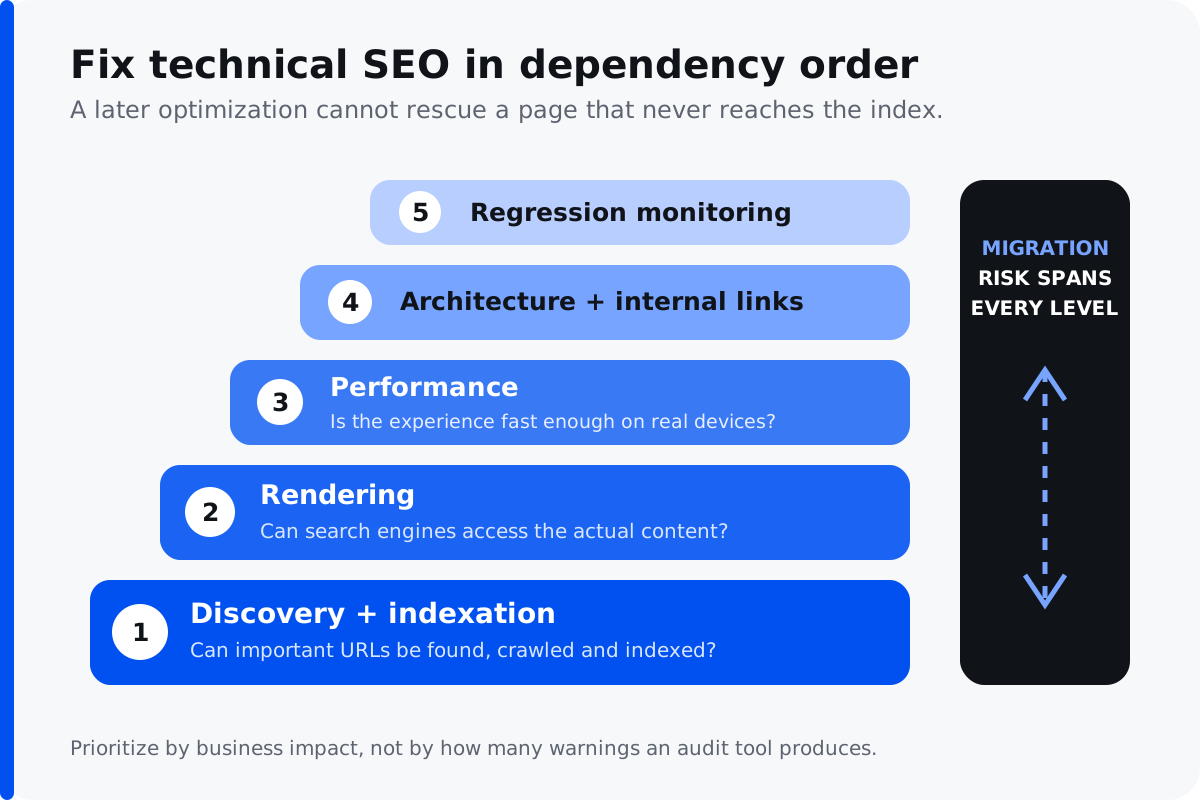
Why the order matters
Run any site through an automated auditing tool and you will get a long list colour-coded by severity. Nearly all of it will be technically true. The trouble is that a tool's definition of severity has almost no relationship to what a problem costs your business — a missing image alt attribute and a canonical tag quietly deindexing your best category page can appear with similar urgency.
So rather than working top to bottom through a report, work through the questions a search engine asks in the order it asks them.
1. Can your pages be found and indexed?
Nothing else matters if the answer is no. This is where the most damaging problems hide, and they are frequently invisible from the front end.
Check what is actually indexed
Google Search Console's page indexing report tells you which pages are indexed and why others are not. The reasons worth investigating are "Excluded by noindex tag" on pages that should rank, "Discovered – currently not indexed" at scale, and "Duplicate, Google chose a different canonical".
A noindex tag left on after a site launch is one of the more common catastrophic errors in this industry, and it is entirely invisible unless you look for it.
Look for orphaned and buried pages
Pages with no internal links pointing at them are difficult to discover and receive little authority. Anything more than three or four clicks from your homepage is effectively deprioritised. Crawl your site and compare the pages found against your sitemap — the gap between the two lists is usually instructive.
Check for crawl waste
Search engines allocate finite crawling to your site. On larger sites, filter combinations, sort orders, session parameters and pagination can consume most of it, leaving your genuinely valuable pages crawled rarely. This is especially acute on eCommerce, which we cover in more depth under eCommerce SEO.
2. Can your content be rendered?
If your content only appears after significant JavaScript execution, search engines may not see all of it, and what they do see may arrive late. Test by viewing a rendered version of the page rather than the source, and confirm that your main content and internal links are present.
This is not an argument against modern frameworks — it is an argument for server-side rendering or static generation for content that needs to rank. It also matters increasingly for AI answer engines, which retrieve pages before generating answers and are less patient than traditional crawlers.
3. Is the site fast enough?
Speed affects rankings, but it affects conversion rate considerably more, so the business case rarely depends on the SEO argument alone.
Focus on the metrics Google actually uses — the Core Web Vitals — and test on a throttled mobile connection rather than your own laptop on office broadband. The usual culprits are unoptimised images, render-blocking scripts, too many third-party tags, and layout that shifts as elements load.
Aim for genuinely fast rather than a perfect score. The last few points of a performance metric usually cost more engineering effort than they return.
4. Is the structure sensible?
Site architecture determines how authority flows and how easily anything is found. Important pages should sit close to the homepage and receive internal links from relevant content.
Check for the common structural problems: pages competing for the same keyword, redirect chains where one URL points to another which points to a third, and internal links pointing at URLs that redirect rather than at the final destination.
Then add structured data — organisation, product, article, FAQ, local business as appropriate. It will not make you rank, but it helps machines interpret your pages correctly, which matters more as AI systems parse content directly.
Technical myths worth ignoring
Several pieces of received wisdom persist long after they stopped being true, and chasing them wastes time that could go on things that matter.
You need a perfect performance score. You do not. Scores in the high nineties look satisfying and the engineering effort to get there from the eighties rarely returns anything. Aim for genuinely fast on a real mobile connection and stop.
Duplicate content carries a penalty. There is no duplicate content penalty in the sense people mean. Search engines pick one version to rank and ignore the others, which is a filtering behaviour rather than a punishment. It still costs you — the wrong version may get chosen — but the fix is canonical tags, not fear.
More indexed pages is better. Frequently the opposite. Thin, near-identical pages dilute your site rather than strengthening it, and on large sites they consume the crawl budget your important pages need. Removing pages is a legitimate optimisation.
You need to submit your site to search engines. Not since roughly 2005. If your pages are linked and crawlable they will be found. Search Console helps you understand what is happening, but submission is not what gets you indexed.
The core technical SEO checklist
Underneath the priority order, most technical SEO audits come back to the same short list of fundamentals. Treat this as the checklist to confirm before anything advanced:
- HTTPS everywhere — a valid SSL certificate and no mixed-content warnings.
- An accurate XML sitemap submitted in Google Search Console, listing only indexable pages.
- A sane robots.txt that blocks nothing important and points to the sitemap.
- Correct canonical tags so search engines pick the version of a page you intend.
- Core Web Vitals — Largest Contentful Paint, Cumulative Layout Shift and Interaction to Next Paint — passing on mobile.
- Clean status codes — no broken links, no redirect chains, proper 301s for anything moved.
- Structured data — schema markup for organisation, product, article, FAQ and local business where relevant.
None of these will make a mediocre page rank on its own, but any one of them broken can hold back an otherwise strong site. Technical SEO is the process of making sure the foundation is sound so your content and links can do their work.
Technical SEO tools worth using
You do not need an expensive stack to run a competent technical SEO audit. Google Search Console is free and authoritative for indexing, Core Web Vitals and manual actions. A crawler such as Screaming Frog surfaces broken links, redirect chains, duplicate titles and orphaned pages. Lighthouse handles page speed and best-practice checks. Platform tools like Semrush or Ahrefs add a site audit tool with scheduled monitoring, and on WordPress a plugin such as Yoast SEO manages the on-page basics — titles, meta descriptions, sitemaps and schema.
The tool matters less than the habit. Whichever site audit tool you choose, the value comes from running it regularly, reading it in order of impact, and fixing the two or three technical SEO issues that actually move rankings rather than clearing every warning.
Advanced technical SEO worth knowing about
Once the fundamentals are solid, a handful of advanced technical SEO techniques become worthwhile. JavaScript SEO matters for single-page applications where content depends on rendering — server-side rendering or static generation keeps that content visible to crawlers and to AI answer engines. FAQ schema and richer structured data help machines interpret your pages as AI systems parse content directly. Pagination handling, hreflang for multi-region sites, and log-file analysis of how search engines actually crawl you are the next layer for larger, more complex sites. Most businesses never need to reach this far — the fundamentals above are where the ranking gains live.
Watch for regressions
The most frustrating technical problems are the ones that reappear. A developer adds a noindex tag while working on staging and it ships to production. A plugin update changes how canonicals are generated. Someone uploads forty images straight from a camera and the page weight triples overnight.
Sites decay unless somebody is watching, so build in monitoring rather than treating technical SEO as a project that finishes. At minimum: check Search Console coverage reports monthly, monitor Core Web Vitals on your key templates, and set an alert for sudden changes in indexed page count. Catching a regression in week one is trivial; catching it in month six means explaining a traffic drop nobody can account for.
It is also worth having a pre-launch checklist for any significant site change — confirm robots directives, verify canonical tags, check that redirects are in place, and test that key pages still render their content. Ten minutes before deployment prevents most of the incidents that take weeks to recover from.
The one that catches everybody: migrations
Site migrations cause more severe traffic loss than any other technical issue, and almost all of it is preventable. If URLs are changing, every old URL needs mapping to its closest new equivalent before launch, not after somebody notices the traffic has halved.
This applies to redesigns, replatforms, domain changes and even significant structural reorganisations. If you are planning any of these, our technical SEO team handles migrations specifically because recovery costs considerably more than prevention.
What to do with the list
Rank everything you find by likely revenue impact against implementation effort, and be ruthless about the bottom of the list. A handful of fixes will account for most of the available gain; the rest can wait indefinitely without anybody noticing.
If you would rather have this diagnosed properly, an SEO audit covers technical health alongside content and authority, and hands you a prioritised roadmap. For the fixes themselves, technical SEO services is the ongoing work.
Google's own documentation on crawling and indexing is the authoritative reference for most of the above.