Video SEO: How to Get Your Videos Found

Video SEO means optimising video so it gets found — both inside YouTube, which is a search engine in its own right, and in Google results, where videos appear for many queries. The two reward different things: YouTube weighs watch time and engagement heavily, while Google needs to understand what a video contains through metadata, transcripts and structured data.
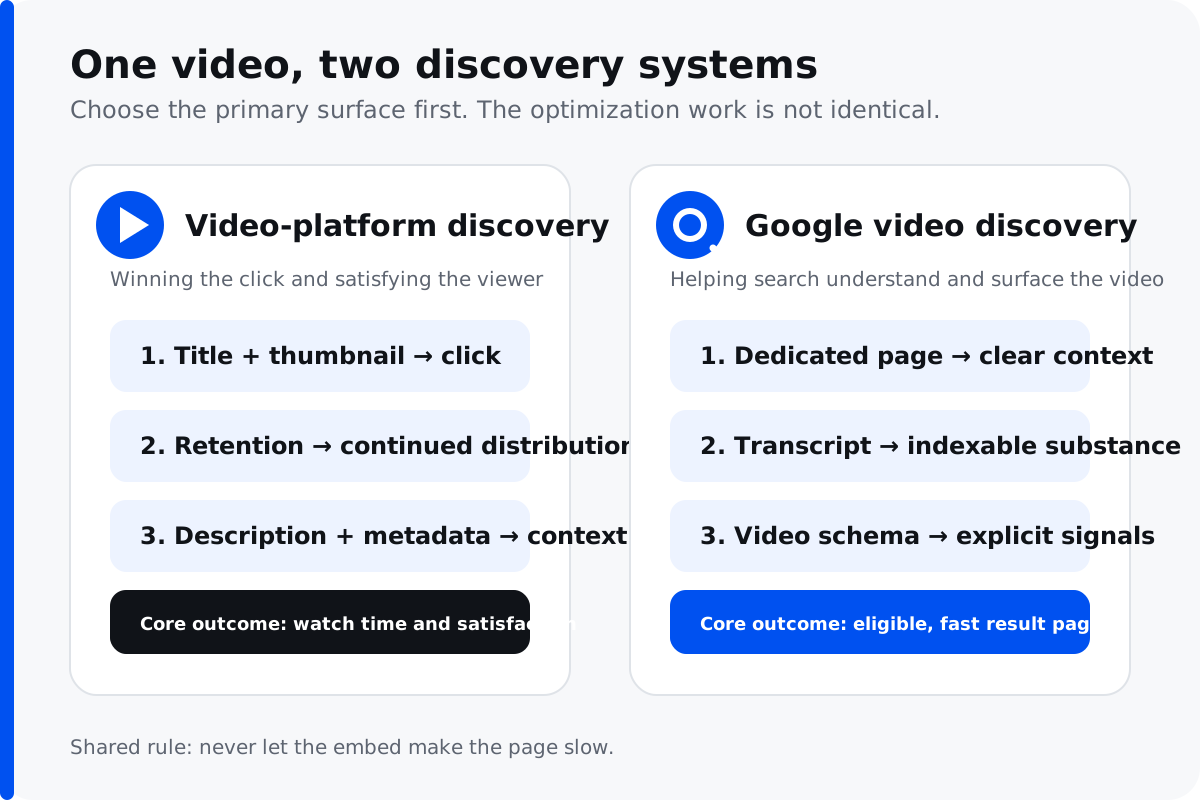
Decide which search you are optimising for
This determines almost everything else, and it is the step most businesses skip.
YouTube search is about building an audience on the platform. Success is measured in watch time, subscribers and engagement, and the algorithm strongly favours videos that keep people on YouTube. Optimising here means titles that earn clicks, hooks that stop people leaving in the first fifteen seconds, and content that leads to another video.
Google search is about video appearing alongside web results, usually for how-to and demonstration queries. Success is measured in whether people find and use your video, often embedded on your own site. Optimising here means helping Google understand the content and match it to a query.
You can pursue both, but the decisions differ. A video designed to maximise YouTube watch time is structured very differently from one designed to answer a specific question quickly.
Optimising for YouTube
The title and thumbnail decide most of it
Together they determine whether anyone clicks, and click-through rate is a substantial input to how widely a video gets shown. Titles should be clear about what the viewer gets rather than clever — a title someone understands instantly outperforms one that requires interpretation.
Thumbnails matter more than most businesses accept. A custom thumbnail with legible text and a clear focal point will outperform an automatic frame grab consistently. Test them on a phone, at the size they will actually appear, because that is where most viewing happens.
Retention is the metric that compounds
YouTube favours videos that hold attention. The first fifteen to thirty seconds are disproportionately important — this is where most of the audience decides whether to stay, and a slow introduction loses people before you have said anything useful.
State what the video covers immediately. Long branded intros, throat-clearing and "before we start, please subscribe" all cost you retention at the moment it matters most.
Description and metadata
Write a genuine description rather than a keyword list. The first couple of lines are visible before anyone expands it, so put the useful summary there. Add timestamps for longer videos — they improve usability and can surface as chapters in search results.
Optimising for Google
Give it a page of its own
An embedded video on a page dedicated to that topic performs considerably better than one buried among other content. Surround it with genuinely useful text — a summary, key points, the transcript — because Google still relies heavily on text to understand what a video covers.
Transcripts do more than accessibility
A transcript makes the spoken content indexable, which is the most direct way to help search engines understand a video. It also makes the content usable for people who cannot watch with sound, prefer to skim, or are on a slow connection — which is a substantial share of your audience.
Auto-generated captions are a starting point, not a finish. They handle names, technical terms and accents badly, and an inaccurate transcript actively misleads about what the video contains.
Add video structured data
VideoObject markup tells search engines the title, description, thumbnail, duration and upload date. It is what makes a video eligible for rich presentation in results, and it is straightforward to implement — this sits within our technical SEO work.
Do not let video slow your site down
This is where video SEO frequently backfires. Self-hosted video is heavy, and autoplaying it or loading a full embed player on page load can devastate your Core Web Vitals. A page that ranks worse because of the video you added to help it rank is a poor trade.
Use a facade — a lightweight thumbnail that loads the actual player only when clicked. It preserves the video's value while removing almost all of the performance cost. And host on a video platform rather than serving files yourself unless you have a specific reason.
Where video genuinely helps
Beyond ranking the video itself, video improves the pages it sits on. Demonstrations answer questions text struggles with. A face builds trust faster than copy. And people stay on pages with video longer, which correlates with the engagement signals search engines observe.
It is particularly effective for products that need showing, services where trust is the barrier, and any explanation where "let me show you" beats "let me describe it". For businesses competing on expertise, video is one of the more efficient ways to demonstrate it — which is why it sits inside our content marketing practice rather than being treated as a separate discipline.
The mistake worth avoiding
Producing video because it seems obligatory, without deciding what it is for. Expensive brand films that nobody searches for and nobody watches are common, and they consume budget that would have produced twenty useful how-to videos answering questions customers actually ask.
Start from the questions. What do prospects ask before buying? What do customers get wrong? What is difficult to explain in writing? Those make videos with a job, and videos with a job get watched.
Video sitemaps and helping Google index your video
If a video matters for Google search, help Google find and understand it. A video sitemap (or a video XML sitemap entry alongside your regular sitemap) lists each video with its title, description, thumbnail and location, so search engines can index your video content even when the player is loaded dynamically. Google Search Console then shows how that video content is performing in search results and flags any indexing problems.
Combined with VideoObject structured data on the page, a video sitemap is the most reliable way to make sure your video appears in Google rather than sitting invisible inside an embed. This is part of the same technical SEO foundation that supports the rest of your site.
Video length, titles and thumbnails
Video length should follow the question, not a formula. A how-to answer that runs ninety seconds will hold attention and earn video views; the same content padded to ten minutes will not. Match length to intent — short for a direct answer, longer only where the topic genuinely needs it.
The video title carries most of the search weight on both YouTube and Google, so lead with the words people search and keep them near the front. A high-quality video thumbnail does the rest of the work: on YouTube the thumbnail image is often the single biggest lever on click-through rate, which in turn feeds how widely the video gets shown. Treat titles and descriptions as search assets, not afterthoughts.
YouTube SEO and repurposing video content
YouTube is the second-largest search engine, so YouTube SEO is worth treating as its own channel: a keyword in your video title and description, an accurate transcript, and end screens that lead to the next video all compound over time. One well-optimised video can also be repurposed across video platforms and embedded in blog content on your website, so a single production earns search visibility in several places at once. That efficiency is why video sits inside our content marketing practice rather than being treated as a one-off.
Where to host your video
Where you host changes what video SEO is even possible. Hosting on YouTube gets you into the second-largest search engine and onto Google's video results, and the embed is light — but the viewer can be pulled away to competing videos, and the ranking value accrues to your YouTube channel as much as your site. Self-hosting keeps full control and sends viewers nowhere else, but the files are heavy and easy to get wrong for Core Web Vitals. A dedicated video platform such as Vimeo or Wistia sits in between: fast players, no competing recommendations, and clean analytics, at the cost of the discovery YouTube provides. For most businesses the pragmatic answer is both — publish on YouTube for reach, and embed a lightweight player on your own optimised page for the Google video result and the on-page engagement. Whichever route you choose, keep the same transcript and structured data on the page so search engines can read the video regardless of where the file physically lives.
Where to start
Pick three questions your sales or support team answers repeatedly. Film short, direct answers — production value matters far less than clarity. Publish each on its own page with a transcript and structured data, and put them on YouTube too with proper titles and thumbnails.
If you would rather have the strategy handled, our content marketing services cover video within a wider content plan, and social media marketing handles distribution beyond search.
Google's video SEO best practices documentation covers the technical requirements in detail.